Price Increase Planner
Every product line, one question: how much can this price rise before the customers it loses outweigh the margin it gains? The planner answers it line by line, then adds up the plan.
$99 USD, one-time. Instant download.
Not what you needed? Full refund within 14 days.
What you get
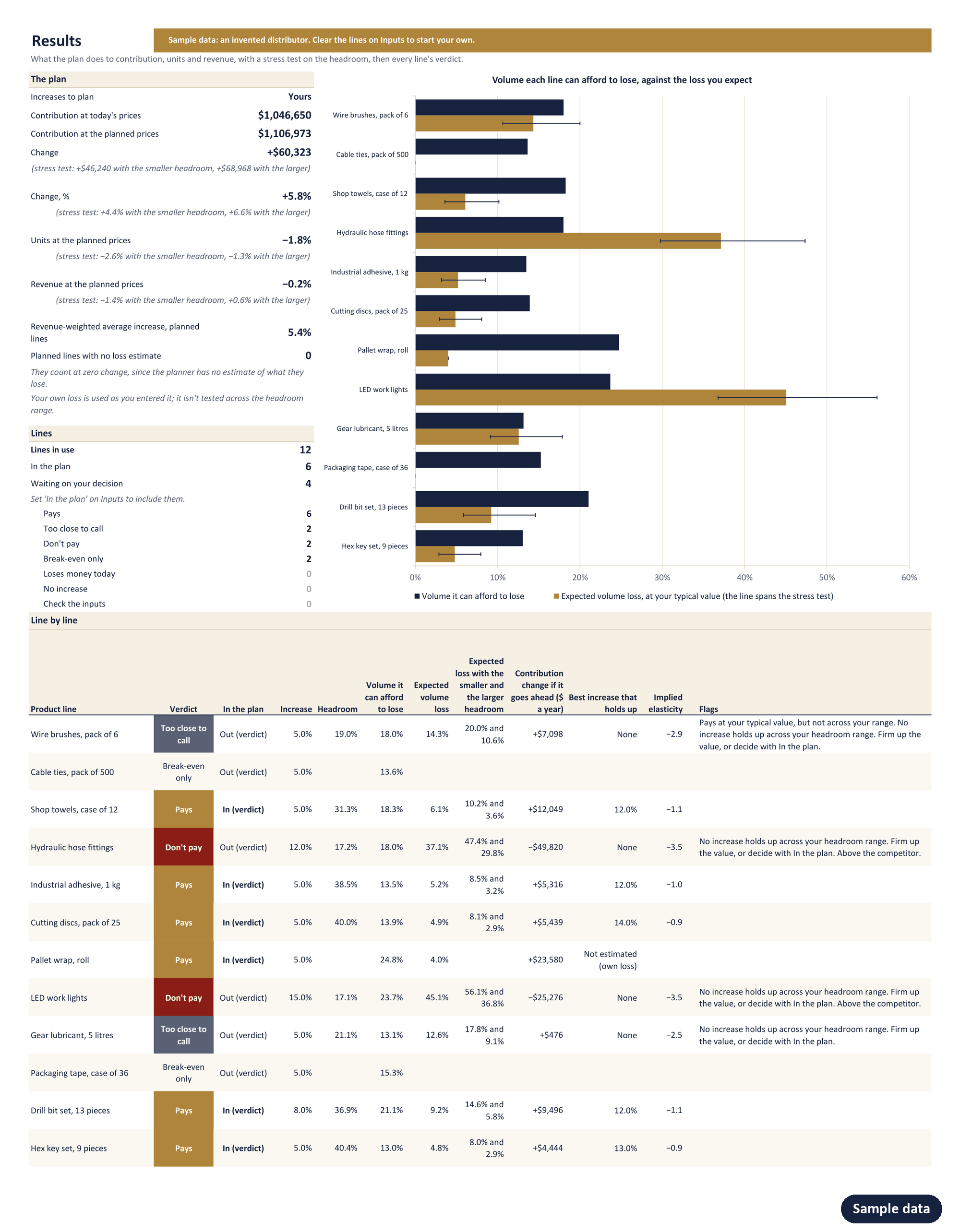
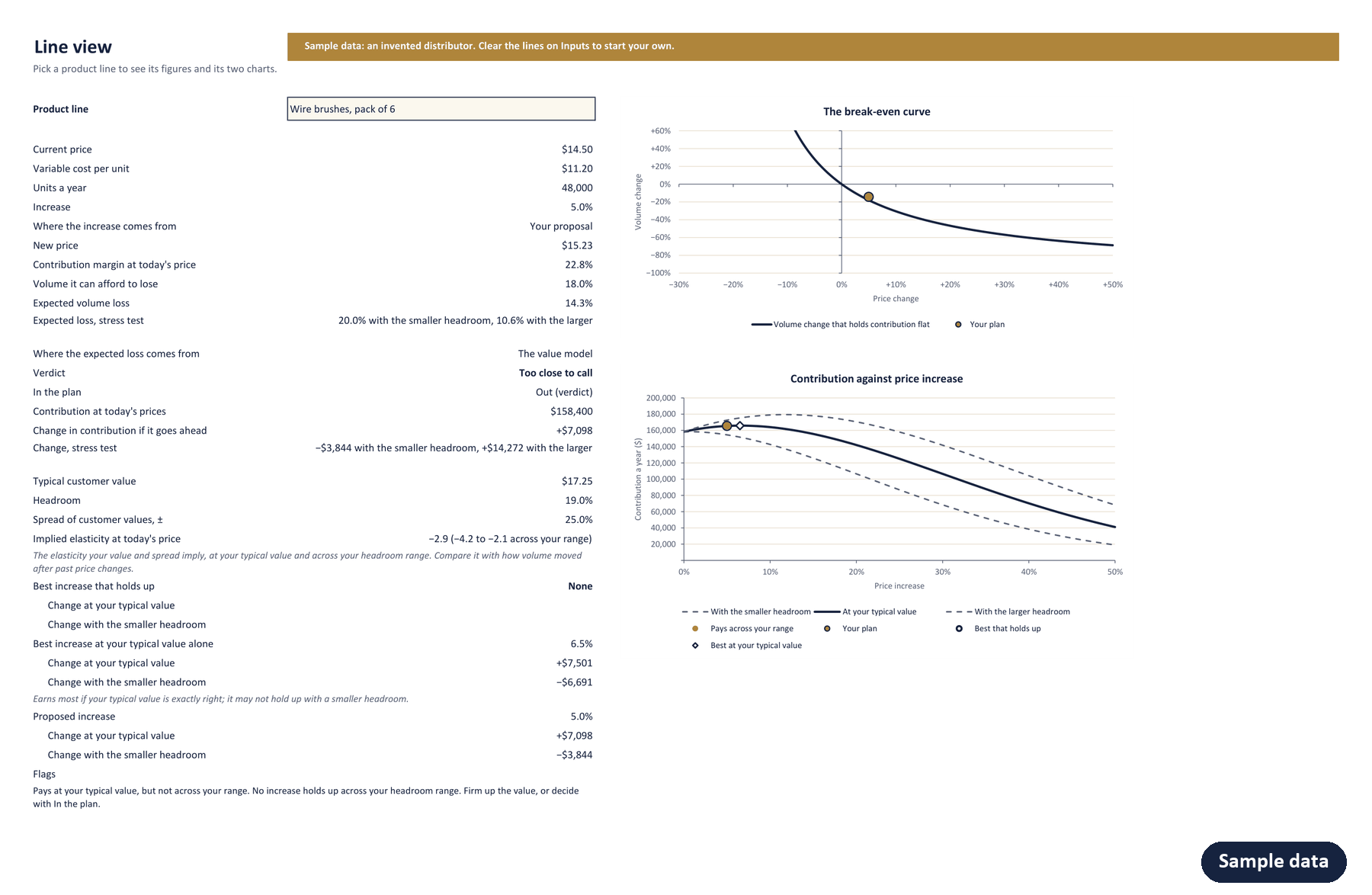
One Excel workbook, opening on an invented distributor's 12 product lines so every sheet has something to show. Select an image to see it full size.
How it decides
Every increase starts with arithmetic. A line with a 25% contribution margin that raises its price 5% can lose 5 ÷ 30, about 16.7% of its volume, before it earns less than it does today. That is the volume it can afford to lose, and it needs only the price, the variable cost and the units. Elasticity Without Econometrics sets out this gate, with no demand model in sight.
What the line will actually lose is an estimate. Tell the planner the most a typical current customer would pay, and how much customers differ, and it counts the share of today's buyers whose limit falls between today's price and the new one. It then tries every increase from 0% to 50%. A price set from cost alone never asks what the customer would pay, which is the argument of Cost-Plus Pricing Is a Confession.
Then it sets one against the other, and tests its own answer. Every value-based verdict is run again with the headroom, how much more than today's price a typical customer would pay, a quarter smaller and a quarter larger. An increase pays only if the volume it can afford to lose still exceeds the loss expected with the smaller headroom, by at least the band in the settings (2 percentage points unless you change it). It doesn't pay only if it fails even with the larger headroom. In between, the planner says too close to call rather than pretending to know. For every line, it also finds the best increase that holds up: the one that earns most with the smaller headroom, among those that pass. Only the increases that pay, and lines that already lose money, go into the plan and the sales brief, unless you decide otherwise.
What it doesn't do
- It doesn't predict how competitors will respond. A competitor price raises a flag, and the value you enter should already allow for the alternatives your customers have.
- It doesn't estimate customer value from your sales history. That figure is yours, and the best increase is only as good as it.
- Each line has one price. Contract, tiered or customer-specific prices need a line each, or an average.
- It isn't a forecast. It says whether an increase is likely to pay, not what next year's sales will be.
- It treats every customer on a line as buying the same amount and either staying or leaving. If a few accounts carry most of a line's volume, give them their own lines.
- It doesn't test price cuts. Its search runs from 0% to 50%.
Try one line first
The free calculators answer this for one product at a time.
Promotion Break-Even Calculator
Set to a price increase: how much volume one product can afford to lose before the increase stops paying.
Open it → Free · interactiveValue-Based Price Calculator
One product's price against its cost, its value to the customer and its competitor, and the price that earns most.
Open it →The planner does every line at once, with the volume each can afford to lose, the increase your value estimates support, and a one-page brief for the sales team.
What you need
Excel for Windows, 2016 or later, including Microsoft 365. No macros, works offline. Your data never leaves your computer.
- One license covers one company's internal use.
- Not what you needed? Write within 14 days for a full refund.
Get an email when it's available. You'll join my newsletter, which you can leave at any time.
Common questions about the planner
What data does it need?
For each product line, its current price, its variable cost per unit and the units it sells a year. That is enough for the break-even figures: how much volume each increase can afford to lose. Add the most a typical current customer would pay, and the planner also estimates the loss, tests its answer across a range, and finds the best increase that holds up. A competitor price adds a flag, and your own estimate of the loss, if you have one, replaces the planner's.
My costs are rising. Does it allow for that?
Yes. Enter the variable cost you will pay after the rise. The planner then compares each increase with leaving the price alone at the new cost, which is the choice you actually face. Contribution at today's prices then means today's prices at the new cost.
Does it work with many products?
Up to 50 product lines in one workbook, each with its own increase or the default. A line can be a single product, a product family or a customer segment, as long as it has one price, one variable cost and one volume. For a larger range, group lines into families, or run the range in batches of 50.
How does the value model work?
Each customer is taken to have a value, the most they would pay. You give the value for a typical current customer and how much customers differ from one another. A customer keeps buying while the price is at or below their value, so the volume an increase loses is the share of today's buyers whose value falls between the old price and the new one. The planner shows the price elasticity your figures imply, so you can check them against experience.
Does it replace an elasticity study?
No, but it works without one. An elasticity study measures how volume responded to past price changes. The planner starts from arithmetic, the volume each increase can afford to lose, which needs no estimate at all, and then sets your estimate against it. If you have an elasticity, compare it with the one the planner shows for your figures, or multiply it by the increase and enter the result as your own expected loss: for moderate increases, an elasticity of −1.5 and a 4% increase give a loss of about 6%.
What if I'm not sure what customers would pay?
That is the usual case, and the planner is built for it. It runs every value-based verdict again with the headroom, how much more than today's price a typical customer would pay, a quarter smaller and a quarter larger, and counts an increase as paying only if it holds with the smaller headroom. For each line it also finds the increase that earns most if the headroom turns out smaller, among those that pass, so an uncertain line still gets an increase you can defend, or a clear sign that none is safe. The guide sets out four ways to estimate the value, from your past price changes to the prices at which you lose deals.
Who does one license cover?
One license covers one company's internal use: anyone in that company can use the planner on its own prices. Using it on another company's prices needs that company's own license.
Can I get a refund?
Yes. Write within 14 days of buying for a full refund. A line on what didn't work is welcome, not required.
How is it delivered?
Straight after payment you land on a download page with the workbook and its guide. The checkout is run by Link, Stripe's payment service, which emails you a receipt and an invoice, and your card statement names it LINK.COM.