Customer Profitability Workbook
Every customer, one question: does it still make money once the cost of serving it is counted? For each one that doesn't, the workbook sizes the fix that closes the gap, then ties the total back to the books.
$99 USD, one-time. Instant download.
Not what you needed? Full refund within 14 days.
What you get
One Excel workbook, opening on an invented distributor's 40 business customers so every sheet has something to show. Select an image to see it full size.
How it decides
Gross margin measures the product, not the customer. Every account also costs the orders it places, the deliveries, the lines picked, the returns, the support hours, the sales visits and the days it takes to pay. Most finance teams know what each of those activities costs in a year, its cost pool, but not what it costs each time. The workbook divides each pool by the year's activity and charges every customer for what it uses. The Revenue You Should Want to Lose walks through why some of the largest accounts turn out to cost more than they earn.
Then it asks the question allocation usually skips: would this cost go down within about a year if the activity went down? Freight would; a salaried rep's visits wouldn't. So every customer gets two readings. On the costs it actually causes, is it worth keeping this year? And with every pool at its full rate, does it pay its way in the long run? A customer can pass the first and fail the second, and then it is worth keeping and worth fixing. Counting allocated overhead as a saving is how good customers get dropped while the overhead stays.
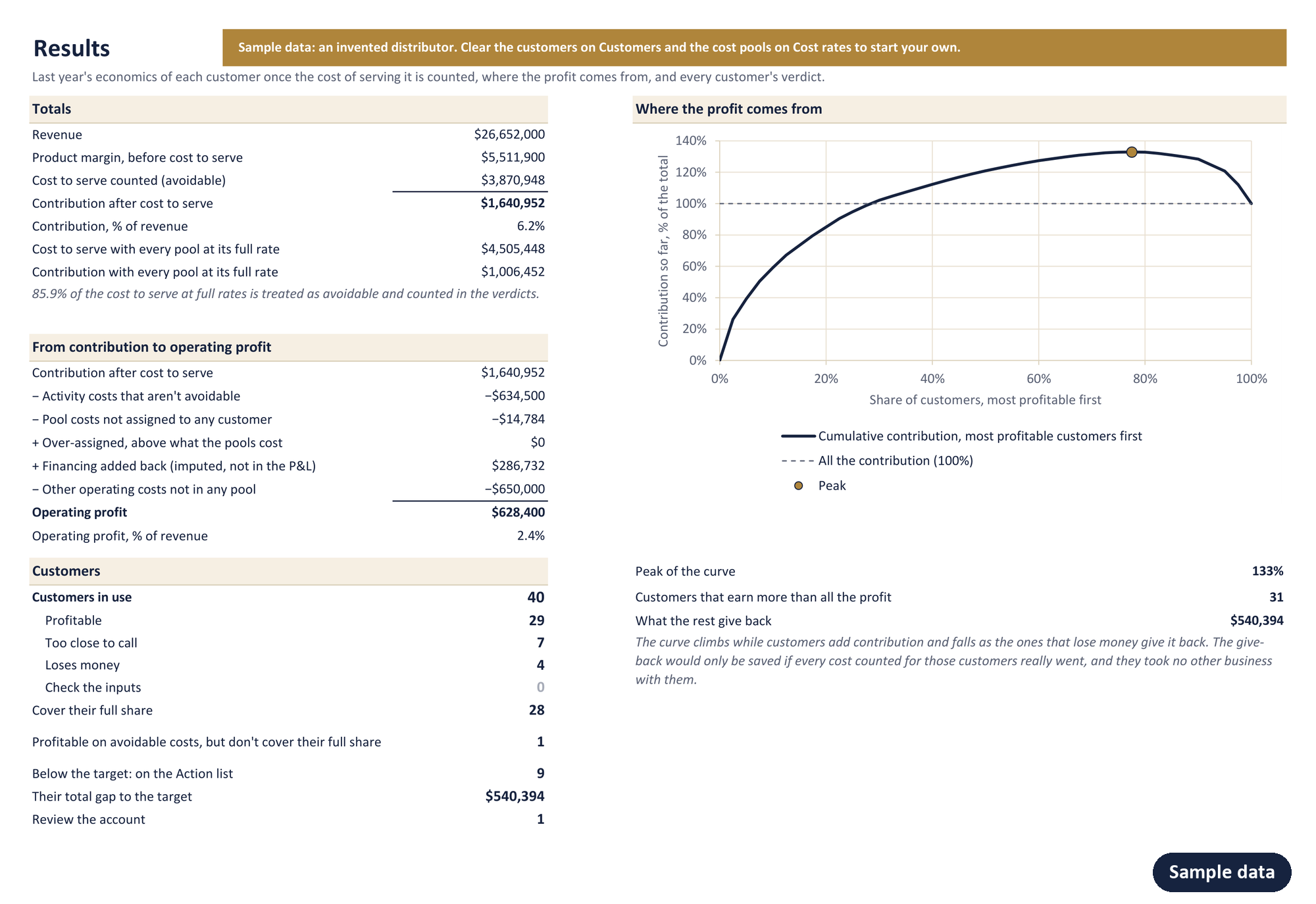
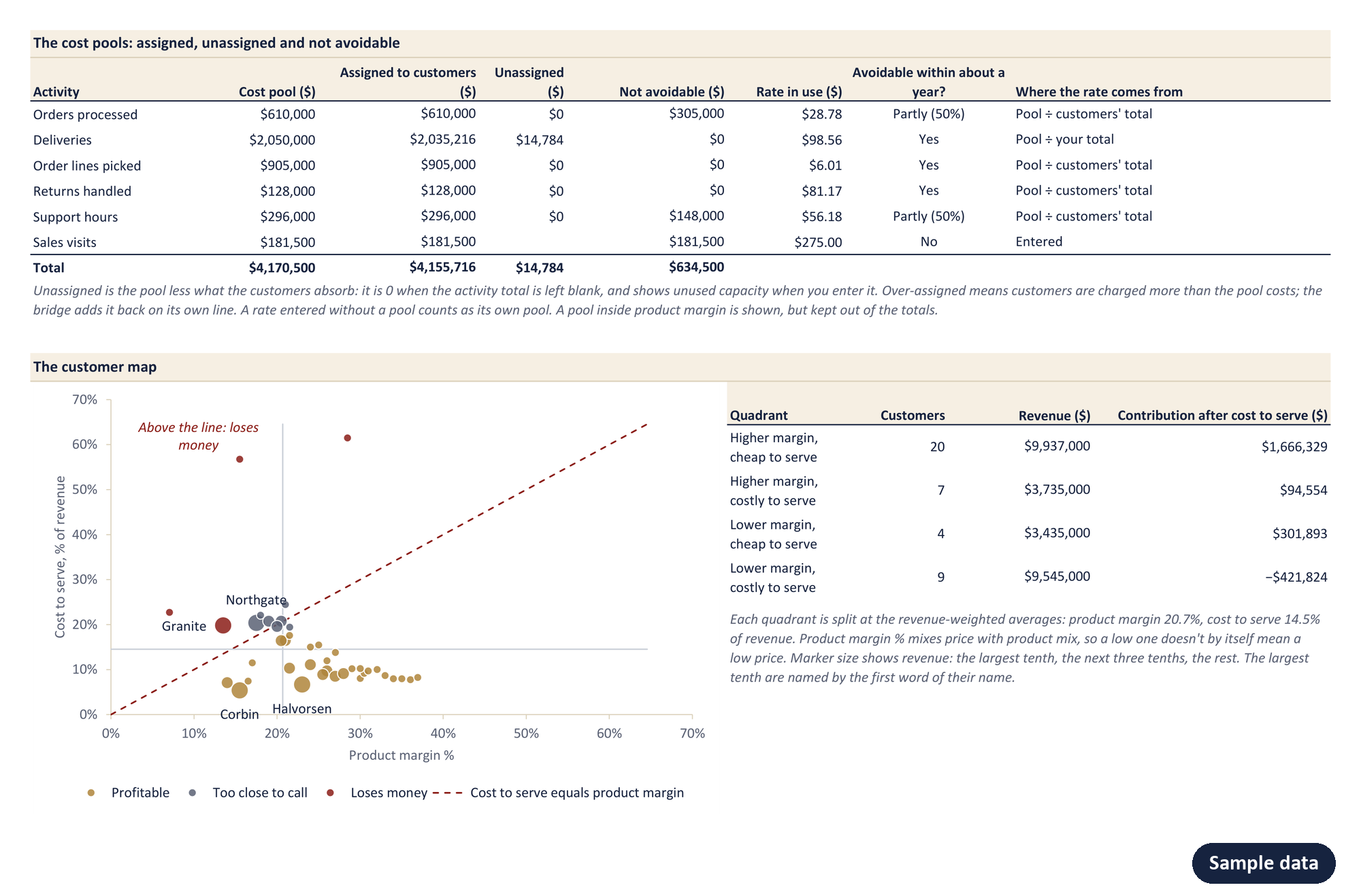
The result ties to the books. Each pool shows what the customers absorb, what is left unassigned and what isn't avoidable, and a bridge runs from total contribution down to operating profit, so the figures can be checked against the P&L before anyone acts on them. Every verdict is tested with all the activity rates a fifth lower and higher: a customer is profitable only if it stays above the target with the rates high, and loses money only if it stays below with the rates low. In between, the workbook says too close to call rather than pretending to know.
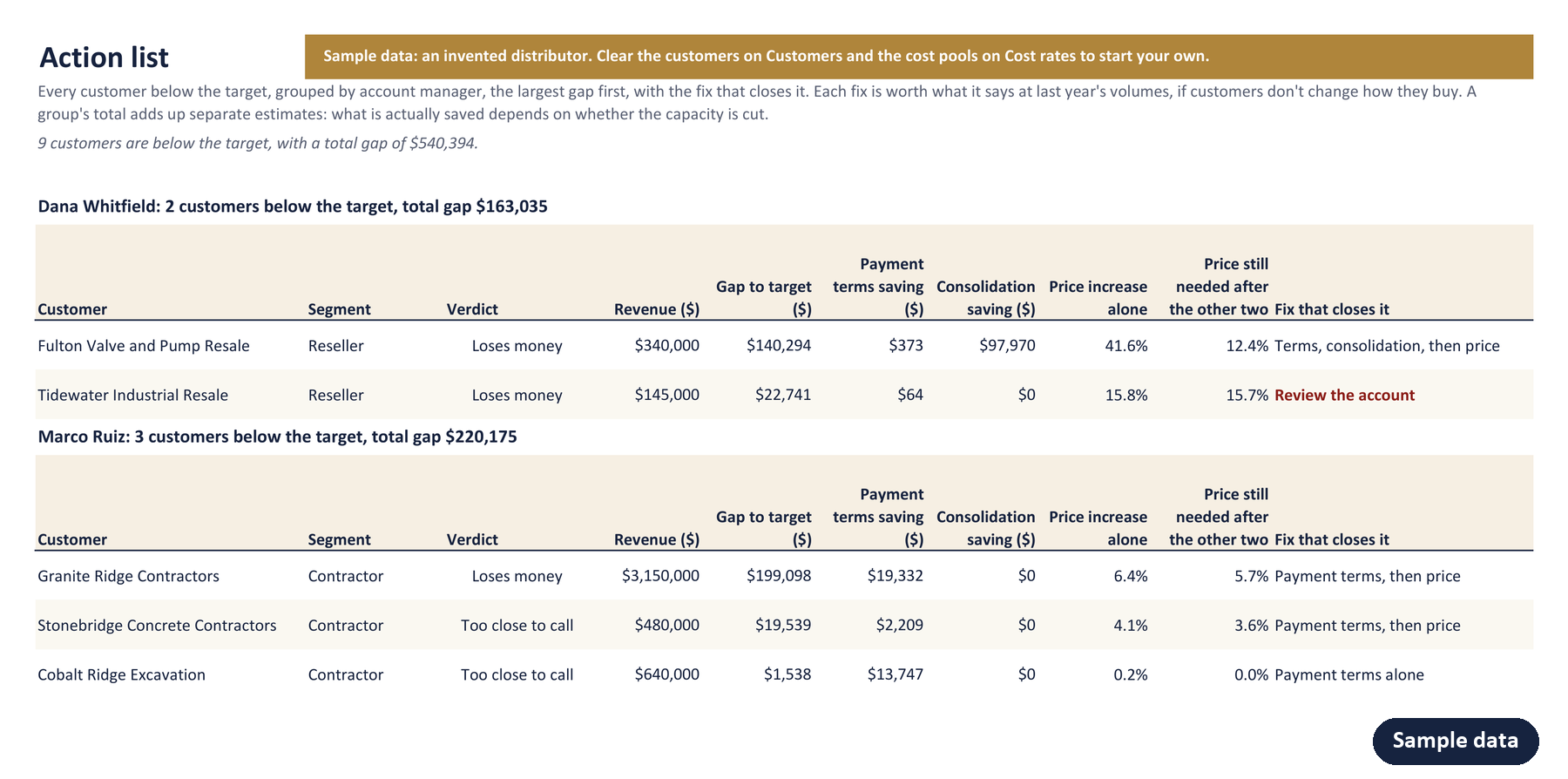
The cumulative profit curve ranks customers by what they contribute and adds them up: it climbs above 100% and falls back as the customers that lose money give profit away. The customer map places each one by product margin and cost to serve, with the line where the two are equal. For every customer below the target, the Action list, grouped by account manager, sizes the fixes in order: payment terms brought to standard, small orders consolidated, and only then the price increase still needed. Whether a customer would stay through that increase is a separate question, and the Price Increase Planner tests it.
What it doesn't do
- It doesn't forecast. It shows last year's economics of each customer and sizes the fixes, but it doesn't predict how customers would react to a price change or a new minimum order.
- It is only as good as the cost rates. Rates built from allocated overhead overstate what dropping or fixing a customer would save; the avoidable question is there to catch that, and it rests on your answers.
- It works at account level. Product mix within each customer is taken as given, and shows up in its product margin, not its cost to serve.
- It uses one rate per activity. A delivery across town and one across the country cost the same, unless you split customers by region.
- It has six activities, plus a column for costs that belong to one customer. Costs that fit neither go in the other operating costs in the bridge.
- It takes up to 250 customers. With more, give the largest their own rows and group the rest by segment.
Try one customer first
The free calculator answers this for one account at a time.
The workbook does every customer at once, ties the total to your books, and sizes the fix for each customer below the target.
What you need
Excel for Windows, 2016 or later, including Microsoft 365. No macros, works offline. Your data never leaves your computer.
- One license covers one company's internal use.
- Not what you needed? Write within 14 days for a full refund.
Common questions about the workbook
What data does it need, and where do I find it?
For each customer, last year's revenue and product margin, from a sales and margin report by customer. The activity counts come from the systems that record them: orders, deliveries and order lines from order entry and the warehouse, returns from the returns log, support hours from a ticketing system, sales visits from the CRM. Days to pay comes from receivables: the average balance divided by revenue, times 365. The cost pools come from the general ledger: the payroll, freight and other spend behind each activity.
I don't know what each order or delivery costs. Can I still use it?
Yes, and most buyers won't know it. Enter what the order desk costs in a year and leave the activity total blank: the workbook divides the pool by the orders your customers placed. In the sample, warehouse picking costs $905,000 a year over 150,620 order lines, so a line costs $6.01 to pick. If you do know a rate, enter it directly instead.
What does "avoidable" mean?
For each activity, the workbook asks whether the cost would go down within about a year if the activity went down. Yes counts the whole rate in the verdict, Partly counts a share, and No counts none of it. Freight and hourly picking labour are usually Yes; a salaried sales team is usually No. The verdict uses the avoidable costs, which say what a customer is worth this year; a second column uses every cost at its full rate, which says whether it pays its way in the long run.
Some of these costs are already in my product cost. Won't they be counted twice?
Not if you tell the workbook. For each cost pool, it asks whether the pool is already inside your product margin, and if it is, leaves it out of cost to serve. Freight booked into the cost of goods is the usual case. Fees you charge customers, such as delivery fees or small-order surcharges, go in their own column, as long as they aren't already in revenue.
Does it replace an activity-based costing system?
No. An activity-based costing system traces cost through many drivers, all year. The workbook takes one year, six activities and an average rate for each: enough to see which customers cost more than they earn, and why, and to check the result against the P&L. If you already have activity-based rates, enter them directly.
How many customers does it handle?
Up to 250 customers in one workbook. With more, give the largest accounts their own rows and group the rest as "All other accounts" by segment.
Who does one license cover?
One license covers one company's internal use: anyone in that company can use the workbook on its own customers. Using it on another company's customers needs that company's own license.
Can I get a refund?
Yes. Write within 14 days of buying for a full refund. A line on what didn't work is welcome, not required.
How is it delivered?
Straight after payment you land on a download page with the workbook and its guide. The checkout is run by Link, Stripe's payment service, which emails you a receipt and an invoice, and your card statement names it LINK.COM.